Chrome can do that with the right extension, and a few other routes work too. Below are three of them, what each costs and where each one falls short. One of the three is our own extension, InvestFellow, so keep that in mind as you read. In InvestFellow, price alerts are a Premium feature, and we say so wherever it matters.
Nothing here is advice on what to buy or sell. An alert tells you a price was crossed. What you do about it is up to you.
What a price alert is (and isn't)
You pick a stock and a target price, above or below where it trades now. When the quote crosses that level, you get a notification. That's all it is. It isn't a signal, a forecast or a recommendation. Quotes can be delayed, so treat an alert as a nudge to go check the actual price.
Three ways to get one
1. A finance app on your phone
Yahoo Finance's iOS app lets you set custom price alerts, and it sends a push notification to your device when the target is met (Yahoo Help, "Set and manage custom price alerts for stocks in Yahoo Finance for iOS"). Pick this if you want the alert on your phone. It won't show up in Chrome on your computer. For Android and desktop options, check the app's own help pages.
2. A free alerts extension
If alerts are all you want, a dedicated extension can be enough.
- StockPriceAlerts (Chrome Web Store) is free. You enter a ticker and a target price, and it sends Chrome notifications. Its listing says it covers US stocks and ETFs on NYSE and NASDAQ, and that there's no login. The same developer offers phone push and email alerts at stockpricealerts.io, free for up to 10 alerts according to the listing.
- StockEye (Chrome Web Store) sends a notification when a price crosses your trigger. The listing says the free version takes up to 3 symbols and the full version up to 10, that it only supports NASDAQ stocks for now, and that it offers in-app purchases.
Based on their listings, both are alerts tools only. Neither puts a ticker bar on the pages you browse.
3. InvestFellow (Premium only)
InvestFellow is a stock ticker bar for Chrome and Edge. A thin bar at the top or bottom of the page shows the stocks, ETFs and indices on your watchlist. The bar and the watchlist are free, and you don't need an account or a sign-up to use them.
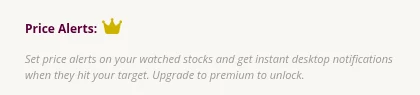
Price alerts are not part of the free plan. They need Premium, which costs $4.99 a month after a 7-day free trial and is paid through PayPal. On the free plan, the Price Alerts section only shows an upgrade message.
With Premium, you set a target price for a stock on your watchlist, and Chrome shows a notification when the price crosses it. Premium also refreshes prices every 4 seconds (the free plan refreshes every 2 minutes), and adds crypto, a second toolbar for market movers (Index Funds, Most Active, Crypto, Top Gainers, Top Losers) and AI insights. You don't need any of those if alerts are the only thing you're after. Quotes come from Yahoo Finance through InvestFellow's API, and prices can be delayed.
Two limits. Alerts only work for stocks on your watchlist. And Chrome has to be open to receive them.
How to set a price alert in InvestFellow
These steps need Premium (7-day free trial, then $4.99 a month). They're the same in versions 2.0.2 and 2.0.4.
- Install InvestFellow from the Chrome Web Store (or the Edge Add-ons page). Pin the icon from the extensions menu if you want it in the toolbar.
- Click the InvestFellow icon to open the popup. Under "Quotes to monitor", search for your stock by company name or ticker and add it. You add stocks one at a time.
- Upgrade to Premium from the popup if you haven't yet. Alerts stay locked until you do.
- Scroll to "Price Alerts:". In the first dropdown ("Ticker..."), pick your stock. It only lists stocks already on your watchlist, and the price box fills in with the current price.
- In the second dropdown, choose "goes above" or "drops below".
- Type your target in the "Price" box.
- Click "+ Add", or press Enter.
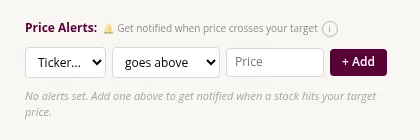
Your alert shows up as the stock plus a price, for example "AAPL ≥ $300". When the price crosses your target, Chrome shows a notification, and the notification stays on screen until you dismiss it. The alert fires once. It then moves to a "Triggered" list, where "Reset" arms it again and "×" deletes it.
If you take a stock off your watchlist, its alerts stay saved but stop firing. The popup greys them out and shows a warning to add the stock back. Adding it back should start them again.
Which one should you pick?
- You want alerts on your phone: use a finance app.
- You only want alerts, for US stocks, and want to pay nothing: try a free alerts extension and see whether its limits suit you. InvestFellow won't fit here, because its alerts are Premium.
- You'd also like a price bar on whatever site you're on, and you're fine paying for alerts after the 7-day trial: InvestFellow. The ticker bar is free. Alerts are Premium.
If an alert doesn't show up
- Check that Chrome is open. Alerts only fire while the browser is running, and quotes are fetched through the pages you have open, so keep a regular web page open too.
- Check that your computer allows notifications from your browser. InvestFellow's notifications permission is granted when you install it, so the browser doesn't ask. Your operating system can still block or silence notifications from Chrome or Edge, for example Windows' Do Not Disturb or Focus settings, or the macOS Notification settings.
- Check that the stock is still on your watchlist. Alerts for a stock you removed stay saved but don't fire.
- Check whether the alert is already under "Triggered". An alert fires once. Press "Reset" to arm it again.
- Remember that quotes can be delayed, and the price you see when the notification arrives may differ slightly from your target.
FAQ
Is there a free way to get stock price alerts in Chrome?
Yes, with other extensions. StockPriceAlerts is free according to its Chrome Web Store listing, and StockEye has a free version limited to 3 symbols. InvestFellow's ticker bar and watchlist are free, but its price alerts need Premium.
Do I need an account to use InvestFellow?
No. You don't need to create an account or sign up for the free plan or for Premium. Premium is paid through PayPal.
Does InvestFellow work in Edge?
Yes. It's listed on the Microsoft Edge Add-ons store too.
How often do prices update?
Every 2 minutes on the free plan, and every 4 seconds on Premium. Prices can be delayed.
Is this financial advice?
No. Prices and alerts are information only. Do your own research before you make an investment decision.