Stock prices on any page
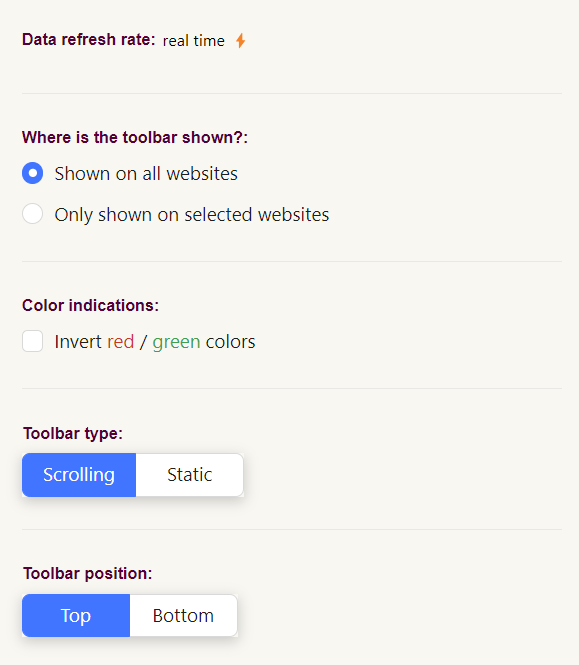
The bar can sit on every site you open in Chrome, or only on the sites you pick. On the free plan, prices refresh every 2 minutes. Premium refreshes them every 4 seconds. Quotes can be delayed.
Where the bar shows up
Put it at the top or the bottom. Choose a scrolling bar or a static one, and swap the up and down colors if you want the opposite red and green.
Still choosing? Eight stock ticker Chrome extensions, compared covers what each one does and costs, including ours.
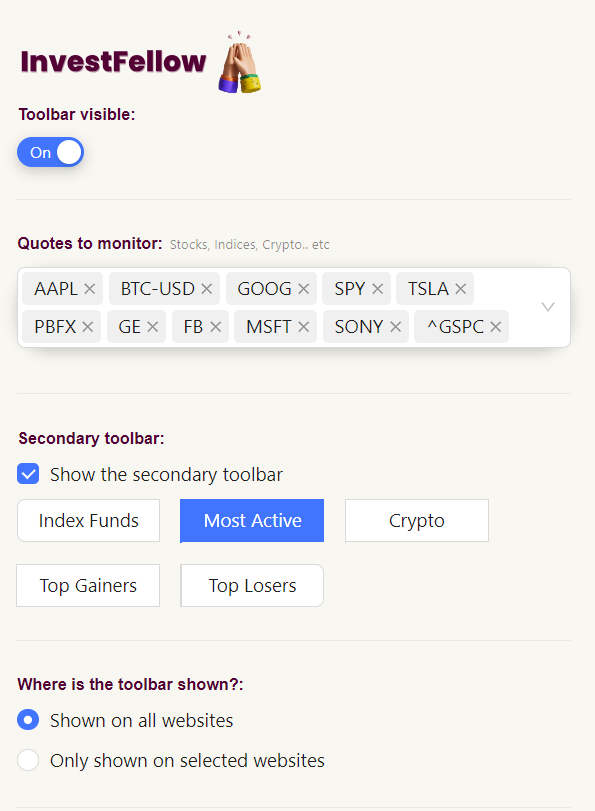
Your watchlist
Add the symbols you want and remove the ones you don't. Search by company name or ticker. The free watchlist covers stocks, ETFs, indices, and futures from US markets and other markets. Hover a symbol for the bid and ask. Click it to open the chart. Crypto symbols, such as BTC-USD in the screenshot, are part of Premium.
Coming from Finance Toolbar? There's no import, so you add symbols one at a time. This guide has the steps. Or see four ways to keep a watchlist in Chrome.
Price alerts
Price alerts are a Premium feature. Choose a price for a stock on your watchlist, and Chrome sends a desktop notification when the price crosses it. If you searched for a stock price alert extension, this is that feature: a notification, not an order.
Want the steps? Read how to get stock price alerts in Chrome, including what to check if a notification doesn't show up.
Market movers
Premium can show a second bar for market movers: top gainers, top losers, most active names, index funds, or crypto. The settings screen in the watchlist section includes that bar. It is a list of what is moving. It is not a list of what you should buy.
AI stock insights
On Premium, hover a ticker for a short AI note on momentum, liquidity, timing, and context. Crypto quotes on the watchlist, including Bitcoin and Ethereum, are part of Premium too.
Not financial advice. Prices and AI insights are information, not a recommendation to buy or sell. Do your own research before you make an investment decision.
Guides
Twenty-three short guides from us. One covers stock price alerts in Chrome. One covers alternatives to Finance Toolbar. One compares stock ticker extensions. One covers where to keep a watchlist in Chrome. One is for Edge: how to add a stock ticker to Microsoft Edge. One answers whether there is a Yahoo Finance Chrome extension. One compares desktop apps with a ticker bar in your browser. One covers the stock ticker on the Windows 11 taskbar. One shows how to add a stock ticker to Chrome. One sorts stock tracker types (portfolio P&L vs price bar). One answers whether there is a Google Finance Chrome extension. One covers a stock ticker in the Mac menu bar. One shows how to track stocks in Google Sheets. One covers Chrome extensions for the Indian stock market. One explains what happened to Nasdaq's Chrome extension. One answers whether there is an Investing.com Chrome extension. One answers whether there is a Bloomberg Chrome extension. One answers whether there is a Seeking Alpha Chrome extension. One answers whether there is a MarketWatch Chrome extension. One answers whether there is a Robinhood Chrome extension. One answers whether there is a Trading 212 Chrome extension. One answers whether there is an eToro Chrome extension. The newest shows how to set stock price alerts on Google. See all guides.
Pricing
The ticker is free. Premium is $4.99 a month after a 7-day free trial. You can cancel anytime through PayPal.
Free
$0 no trial required
- Ticker bar on any site, or only the sites you choose
- Watchlist, search, and a hover card with the bid and ask
- Stocks, ETFs, indices, and futures
- Prices refresh every 2 minutes
Premium
$4.99 per month after a 7-day free trial
- Everything in Free
- Prices refresh every 4 seconds
- Second bar for market movers
- Crypto on your watchlist
- Price alerts
- AI insights on hover
Install it
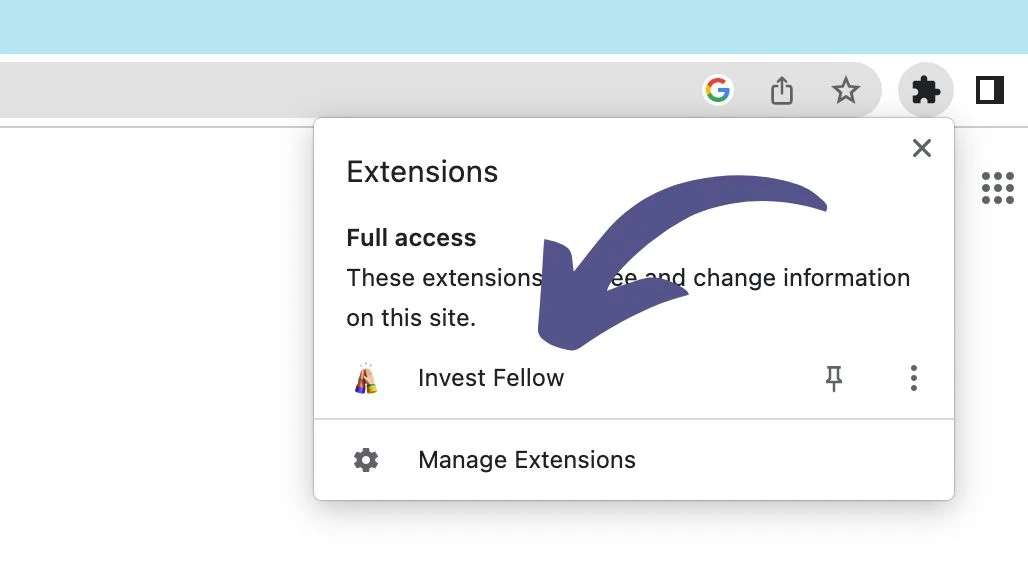
- Open InvestFellow in the Chrome Web Store.
- Choose Add to Chrome.
- Pin it from the extensions menu if you want the icon in the toolbar.
Also on Microsoft Edge Works in Chrome, Edge, Brave and other Chromium browsers.
Questions
Is InvestFellow free?
The ticker bar and your watchlist are free. Premium is optional. It costs $4.99 a month after a 7-day free trial, and it adds faster price updates, a market-movers bar, crypto, price alerts, and AI insights.
Which sites does the ticker work on?
Any site you open in Chrome, or only the sites you choose. In the extension settings, pick “Shown on all websites” or “Only shown on selected websites.” You can also put the bar at the top or the bottom of the page.
What does InvestFellow do with your data?
The Chrome Web Store listing says InvestFellow uses your Chrome account email only to link a Premium subscription. Your watchlist and settings are saved in your Chrome profile. The developer states that your data is not sold to third parties. Read the privacy policy, and check the store listing for the current permissions before you install.
Is this financial advice?
No. Prices and AI insights are for information only. InvestFellow does not tell you what to buy or sell. Do your own research before you make an investment decision.