Edge users have two places to get extensions: Microsoft's Edge Add-ons store and, because Edge is built on Chromium, the Chrome Web Store.
We make InvestFellow, one of the options below, so every fact about the others comes from their own listing (sources at the bottom). Prices in these tools can be delayed and nothing here is advice on what to buy or sell.
Two places to get a ticker extension in Edge
| Where | What to know |
|---|---|
| Edge Add-ons store | Microsoft's own store. Search it from Extensions > Get Extensions for Microsoft Edge. |
| Chrome Web Store | Works in Edge once you choose Allow extensions from other stores. Edge warns that Microsoft hasn't verified them, and an extension that relies on a Google sign-in may not work fully. |
Option 1: a ticker bar on every page (InvestFellow)
InvestFellow is on the Edge Add-ons store, and it's the same extension as on Chrome. It puts a thin bar at the top or bottom of any website, or only on sites you choose. The bar can scroll or stay still. The watchlist takes stocks, ETFs, indices and futures. Search by company name or ticker, hover a ticker for ask and bid, and click it for the chart.
The bar and the watchlist are free, with no account or sign-up. Prices refresh every 2 minutes, and you get one free AI insight to try. Premium is $4.99 a month after a 7-day free trial, paid through PayPal. It refreshes every 4 seconds and adds crypto in the watchlist, price alerts, a second bar for market movers (top gainers, top losers, most active, index funds or crypto) and AI insights.
The trade-offs: there's no import, so you add tickers one at a time, and the bar takes space. A top bar pushes the page down by about 30 pixels, and a bottom bar sits over the foot of the page. The extension is closed source.

Set it up in Edge
- Open InvestFellow on the Edge Add-ons store and select Get, then Add extension. To keep the icon in view, open Extensions next to the address bar and choose Show in toolbar.
- Click the InvestFellow icon to open the popup.
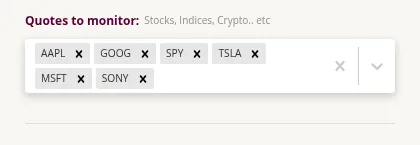
- Under "Quotes to monitor", type a company name or ticker in the "Select symbols" box and pick it from the list. Repeat for each one. The bar starts with six symbols (AAPL, GOOG, SPY, TSLA, MSFT and SONY), and you can remove any of them with the x.
- Choose "Toolbar position" Top or Bottom and "Toolbar type" Scrolling or Static. Under "Where is the toolbar shown?", pick "Shown on all websites", or "Only shown on selected websites" and type each site, such as bing.com, then press Enter.
- Open any regular web page. Your watchlist is in the bar.
Want a notification when a price crosses a level? That's Premium, and the steps are the same in Edge. See our price alerts guide.
Moving from Chrome to Edge
Your InvestFellow watchlist and settings are saved in the browser profile, so they don't carry over from Chrome to Edge. Add your tickers again in Edge. If you pay for Premium, you don't need to pay twice: open the popup in Edge, find "Already subscribed? Restore" and paste your PayPal subscription ID (it starts with I-). One subscription can be restored on up to 3 browsers. Past that, email us.
Option 2: other ticker extensions on the Edge Add-ons store
A few other ticker tools sit on the Edge Add-ons store. Facts below are per each listing.
- Stock Monitor Pro is a panel from the browser toolbar covering US stocks, Hong Kong stocks and China A-shares, with price alerts when a stock's change passes a threshold (±5% by default), a news feed from Eastmoney, and refresh you can set from 2 seconds to 5 minutes, per its listing. The listing says it's free with no account, and cloud sync is optional.
- Monitix – Stock & Crypto Price Alert & Tracker is a watchlist of stocks, ETFs, indices and crypto with above/below price alerts, percentage-change alerts in its Advanced Mode, an alert history, and a Mini Mode floating window that stays on top, per its listing. The listing doesn't state a price.
- Stock Glance offers watchlists, news, financial statements and an earnings tracker, per its listing. Basic features are free. Its premium plan is $9.99 a month and covers TSX, NASDAQ, NYSE, crypto and indices.
In our search on October 28, the Edge store had only a handful of ticker extensions. The comparison guide is worth a look, since those extensions can be installed in Edge too, subject to the Chrome Web Store caveat above.
Option 3: install a Chrome Web Store extension in Edge
Microsoft's help pages walk through these steps:
- In Edge, go to the Chrome Web Store.
- Open the extension's page.
- Select Get extension (or Get).
- If asked, select Allow to allow extensions from other stores.
- Review the permissions and select Add extension.
You can also turn on "Allow extensions from other stores" in Settings > Extensions. When you allow other stores, Edge warns that Microsoft hasn't verified those extensions, so check the permissions and the publisher first.
Which one should you pick?
- Prices in view all the time without clicking: a bar like InvestFellow.
- Hong Kong or China A-shares: Stock Monitor Pro says it covers them.
- Alerts with a floating window: Monitix.
- A specific Chrome extension you already use: install it from the Chrome Web Store.
FAQ
Is there a free stock ticker for Microsoft Edge?
Yes. InvestFellow's bar and watchlist are free on the Edge Add-ons store, and Stock Monitor Pro says it's free to use. Paid plans in this space tend to add faster refresh, alerts or more data.
Can I use Chrome extensions in Edge?
Yes. Turn on "Allow extensions from other stores" and install from the Chrome Web Store. Edge warns that Microsoft hasn't verified those extensions, and ones that depend on a Google sign-in may not work fully.
Do I need an account?
Not for InvestFellow, on the free plan or on Premium, which is paid through PayPal.
Will my Chrome watchlist show up in Edge?
No. InvestFellow keeps your watchlist in the browser profile, so add your tickers again in Edge. Premium carries over with your PayPal subscription ID under "Already subscribed? Restore".
Are the prices current?
Not always. Quotes come from a data source, and delays depend on the exchange and the source. InvestFellow refreshes every 2 minutes on the free plan and every 4 seconds on Premium, and its prices can be delayed. Check your broker before you act on a price.
Why don't I see the bar on some pages?
InvestFellow's bar runs on regular web pages (http and https) only, so it won't show on Edge's own pages, such as edge://settings. If you can't see it, open an ordinary website, and check that the site isn't excluded under "Where is the toolbar shown?".
Is this financial advice?
No. This page is about tools for following stock prices in Edge. It doesn't tell you what to buy or sell. Do your own research before you make an investment decision.