Below is what Google does document, step by step, and one way to get a real price alert in your browser.
What Google offers (and what it doesn't)
| Google feature | What it does | Price alert? |
|---|---|---|
| Follow and watchlists (Google Finance) | Keeps the stocks you pick in one list, with related news | No |
| Tasks (Google Finance) | Sends a scheduled market update at a time you choose | Not as Google describes it |
| Google Alerts | Emails you new search results for a topic | No, it watches news, not prices |
If you've seen a tutorial that tells you to click a bell next to a stock and enter a target price, we couldn't find that anywhere in Google's own help. Google's pages may change, so check them yourself if a feature turns up in your account.
Follow a stock in Google Finance
Following a stock puts it on your watchlist. Here's how Google's help describes it:
- Go to google.com/finance.
- Search for a stock and click it.
- Click Follow, to the right of its name.
- It goes into your default watchlist. To add it to another list, click "Added to watchlist" and pick the lists you want.
To make a new list, go to "Your watchlists", choose New watchlist, give it a name, then use Add investments. Under each list there's a "Your watchlist in the news" section. You need to sign in with a Google Account to make a custom watchlist.
Google also shows a banner when a stock on your watchlist has an earnings call going on. That's the closest thing to a stock-specific heads-up we found in Google's help, and it's about earnings calls, not price.
Get scheduled updates with Google Finance tasks
The newer Google Finance has a feature called tasks. Google calls them "scheduled market updates". You set one up like this:
- Open Google Finance on the web.
- In the Research panel, choose Create a task.
- Check the card it suggests, pick a delivery time, and click Create.
You can also type a request in the "Ask anything" bar. Google's examples are "Keep me updated on crypto at 8 AM every day" and "Keep me updated each Monday on any new IPOs."
When an update is ready, you get a notification in the Google app on Android or iOS, and in the Research panel. For now, Google says tasks are web-only, and task notifications in the Google Finance Android app will come later.
The key word is scheduled. A task runs at the time you choose. Google's help doesn't say a task can watch a price and fire when it's crossed.
Google Alerts sends news, not prices
Google Alerts emails you when new search results show up for a topic. You can type a company name or ticker, then set how often you get emails, which sources, the language and the region.
That's useful for news about a company. It doesn't track the stock price. A news story can mention a price without the stock trading there, and a stock can cross a level without any new article about it.
Keep in mind: prices can be delayed
Google's Finance disclaimer says its data may be delayed, depending on the exchange, and that Google isn't a broker or investment adviser. The same goes for any alert tool: treat a notification as a reason to go check the price, not as a signal to do anything.
A price alert in your browser: InvestFellow Premium
If you want an actual alert, where you pick a level and get a notification when the price crosses it, you need a tool built for that. Brokerage and finance apps on your phone often have one. On a computer, a browser extension can do it.
InvestFellow is our extension for Chrome and Edge. It puts a thin ticker bar with your watchlist at the top or bottom of web pages. The bar and the watchlist are free. On the free plan prices refresh every 2 minutes and can be delayed. No account or sign-up is needed.
Price alerts are a Premium feature. Premium costs $4.99 a month after a 7-day free trial and is paid through PayPal. It also refreshes prices every 4 seconds and adds crypto, a market movers bar and AI insights.
With Premium you choose a stock on your watchlist, pick "goes above" or "drops below", and enter a price. When the price crosses it, your browser shows a desktop notification.
Two limits worth knowing. Alerts only work for stocks on your InvestFellow watchlist. And the browser has to be open to get them. InvestFellow doesn't connect to your Google Finance watchlist, so you add your tickers again, one at a time.
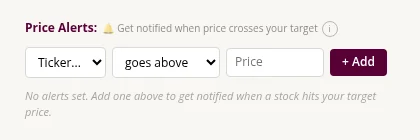
How to set a price alert in InvestFellow
These steps need Premium (7-day free trial, then $4.99 a month).
- Install InvestFellow from the Chrome Web Store or Edge Add-ons.
- Click the InvestFellow icon. Under "Quotes to monitor", search for the stock by name or ticker and add it.
- Start Premium from the popup if you haven't yet. Alerts stay locked until you do.
- Scroll to "Price Alerts:". In the "Ticker..." dropdown, pick your stock. The price box fills in with the current price.
- Choose "goes above" or "drops below", and type your price.
- Click "+ Add", or press Enter.
The alert fires once, then moves to a "Triggered" list. Press "Reset" to arm it again, or "×" to delete it. If a notification doesn't show up, check that your operating system isn't blocking or silencing notifications from your browser. There's a longer checklist in How to get stock price alerts in Chrome.
Google and InvestFellow side by side
| Google Finance | Google Alerts | InvestFellow | |
|---|---|---|---|
| Watchlist | Yes | No | Yes, free |
| Alert when a price is crossed | Not in Google's help | No | Yes, Premium |
| Scheduled updates | Yes, tasks | Yes, news emails | No |
| Where you get it | Google app, Google Finance on the web | Desktop notification in Chrome or Edge | |
| Cost | Free, Google Account for custom lists | Free | Free bar; Premium $4.99/mo after a 7-day trial |
If you'd rather keep prices in a spreadsheet, see How to track stocks in Google Sheets. For Google Finance in Chrome more broadly, see Is there a Google Finance Chrome extension?.
FAQ
Does Google Finance have stock price alerts?
Not according to Google's help pages. They cover following stocks, watchlists and scheduled updates called tasks, but not alerts at a price you set.
Can Google Alerts tell me when a stock hits a price?
No. Google Alerts emails you new search results for a topic, like news about a company. It doesn't watch stock prices.
Can I get Google Finance notifications on my iPhone?
Google says task updates arrive as notifications through the Google app on Android and iOS. Google Finance's own app is on Android, and Google says iOS support is coming. Neither is a price alert.
What's the difference between a task and a price alert?
A task sends an update on a schedule, like every morning at 8. A price alert fires when a price crosses a level you picked, whenever that happens.
Are InvestFellow's price alerts free?
No. The ticker bar and watchlist are free. Price alerts need Premium, $4.99 a month after a 7-day free trial.
Is this financial advice?
No. These are tools for keeping an eye on prices. Nothing here is a recommendation to buy or sell anything.
InvestFellow is made by Tastola and isn't affiliated with Google.