A scrolling stock ticker on your desktop keeps prices in view without a finance tab open all day. There are two ways to get one: a desktop app that floats a strip over every window, or a browser extension that adds a bar to the web pages you read.
We make InvestFellow, the browser option below. Facts about the other tools come from their own sites (sources at the bottom), and we've tried to be fair about where they do more. Prices in any of these tools can be delayed, and nothing here is advice on what to buy or sell.
Two ways to get a ticker on screen
A desktop app sits above everything: your code editor, spreadsheets, a video call. It needs an install and permission to run on your computer, and it's tied to that machine.
A browser bar only shows up on web pages, so it disappears when you switch to another app. In exchange it installs in a click from the Chrome Web Store or Edge Add-ons, and there's nothing to set up on the operating system. If most of your day is spent in a browser anyway, that's often enough.
Desktop ticker apps
Scrollr (Windows, macOS, Linux)
Scrollr is a native app for macOS, Windows and Linux that puts a bar at the top or bottom of any monitor, either in pages or as a continuous scroll. It mixes stocks with sports scores and news. Three "pages" on the bar are free (for example one watchlist, one league, one news source), and an upgrade called Uplink is offered if you want more. You can download it and look around without an account, but live data needs a sign-in. Its site says the code is public.
Finance Toolbar app (Windows, macOS)
The Finance Toolbar app from stefanvd.net shows your stocks, currencies and Bitcoin in a scrolling bar pinned to the top of the desktop, with data from Yahoo Finance. Make the bar taller and it turns into a heatmap table. It can also run as a static or transparent bar and alert you when a stock reaches an ask price. It's distributed through the Microsoft Store and the Mac App Store (Windows 11 and macOS 14 are listed), and its FAQ talks about purchases, so check the store page for the current price. This is the desktop app. The older Finance Toolbar Chrome extension is a separate product, covered in our Finance Toolbar alternative guide.
XTicker (Mac only)
XTicker floats a ticker above the Dock or just below the menu bar on a Mac running macOS 14 or later. Stocks are one of seventeen sources, next to headlines, sports, your calendar and more. It takes up to twelve US symbols with price and percentage change and labels delayed quotes. You can use it without a required payment, account or subscription, and the developer asks for tips. The current download is a beta (1.4.0 Beta 17), with the older 1.3.1 still offered.
A ticker bar in your browser (InvestFellow)
InvestFellow is an extension for Chrome and Edge that adds a thin bar of prices to the web pages you open. You can make it scroll or keep it static, put it at the top or bottom, and show it on every site or only the ones you choose. It runs on regular web pages (http and https), so you won't see it on browser pages such as chrome://settings or edge://settings.
The ticker bar and your watchlist (stocks, ETFs and indices) are free, with prices refreshing every 2 minutes. Premium is $4.99 a month after a 7-day free trial. It refreshes every 4 seconds and adds crypto, a second bar with market movers, price alerts and AI insights on every ticker (your first insight is free). No account or sign-up is needed for either plan. Quotes can be delayed.

Where it falls short of the desktop apps: it can't show prices over a non-browser window, there's no Mac menu bar or Windows desktop placement, and it covers markets only (no sports or news on the bar). It's also closed source.
Set it up
- Install InvestFellow from the Chrome Web Store or Edge Add-ons, then pin the icon.
- Open the popup and add symbols under "Quotes to monitor".
- Under "Toolbar type", pick Scrolling. Under "Toolbar position", pick Top or Bottom.
- Under "Where is the toolbar shown?", choose all sites or only the sites you list.
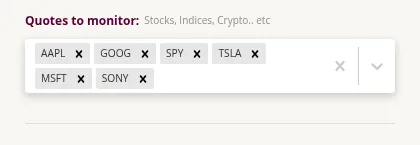
More on building the list in our watchlist guide.
Quick comparison
| Scrollr | Finance Toolbar app | XTicker | InvestFellow | |
|---|---|---|---|---|
| Runs on | macOS, Windows, Linux | Windows, macOS | macOS 14+ | Chrome, Edge (web pages only) |
| Shows over other apps | Yes | Yes | Yes | No |
| Scrolling bar | Yes (or pages) | Yes (or static) | Yes | Yes (or static) |
| Free | Three pages free, Uplink for more | Check store price | Yes, tips optional | Ticker and watchlist free; Premium $4.99/mo after 7-day trial |
| Account | Needed for live data | Not stated | No | No |
| Price alerts | Not stated on the pages read | Yes (ask price) | Not stated | Premium |
| Also shows | Sports, news | Currencies, Bitcoin, heatmap | News, sports, calendar and more | Crypto and market movers (Premium) |
"Not stated" means we didn't find it on the pages we read, not that the tool lacks it.
Which one fits you?
If you want prices visible while you're in Excel, a terminal or a call, get a desktop app. Scrollr is the free pick on Windows or Linux, the Finance Toolbar app suits you if you'd rather install from a store, and XTicker fits a Mac user who likes a busier newsroom-style strip. If you mostly read the web and don't want another program on your computer, a browser bar like InvestFellow is the lighter choice.
FAQ
Is there a free scrolling stock ticker for Windows?
Scrollr runs on Windows and keeps three pages free. In a browser on Windows, InvestFellow's scrolling bar and watchlist are free in Chrome and Edge.
Is there a free stock ticker for the Mac desktop?
XTicker can be used without paying (tips are optional) on macOS 14 or later. Scrollr also has a macOS version with three free pages.
Can a browser extension show a ticker on my desktop?
No. Extensions only run inside the browser, and InvestFellow's bar appears on web pages. For a strip over every app you need a desktop app.
Are the prices current?
It depends on the tool and data source. XTicker labels delayed quotes. InvestFellow refreshes every 2 minutes on the free plan and every 4 seconds on Premium, and its quotes can be delayed.